DjVu to EPUB: why the e-book comes out empty, and how to get real text
Updated October 22, 20265 min read
You converted a DjVu book to EPUB and got a book with a cover and no pages, or pages that are pictures and won't reflow. It's rarely the converter's fault alone: it's about what's inside the DjVu. Here's how to check, and how to get an EPUB with real, reflowing text.
Step 1
Check whether the DjVu has a text layer
Open the book in our free online DjVu viewer; it runs in your browser and doesn't upload the file. Then try two things:
- Search for a word you can see on a page. If the viewer finds and highlights it, the book has a text layer.
- Select text on the page with your mouse or finger. If you can copy it, the text layer is there.
- If the viewer says the book has no text layer, its pages are only pictures, and no converter can turn them into EPUB text without text recognition. Skip to the last section.
Step 2
Convert it with DjVu to EPUB
Open our free DjVu to EPUB converter, drop one or more .djvu or .djv files on the page, and click Download when it's done. Everything happens in your browser, on any computer, phone or tablet, with no sign-up and no size limit. If the book has no text layer, the converter tells you so instead of handing you an empty file. For e-readers and apps popular in Russia and Eastern Europe, DjVu to FB2 makes an FB2 file the same way.
Step 3
Open the EPUB and check the text
Open the file in Apple Books, Google Play Books or your e-reader, or send it to a Kindle with Send to Kindle (step by step). Change the text size: the lines should rewrap to fit the screen. Look at a few pages for misread words. If the original scan was old or faded, some will slip through, because the EPUB's text is the scan's recognised text.
Why a converted DjVu comes out empty
A DjVu page is a picture of the printed page. Some books also carry a hidden text layer, made when the book was run through text recognition (OCR) after scanning; many others never were. Most converters, including e-book managers, don't recognise text themselves: they only read the text layer. When there isn't one, there's nothing to put in the EPUB, so you get a cover, a title and blank or missing pages. The book isn't broken, and converting it again with another tool won't help: the text has to be recognised first.
Why the EPUB doesn't reflow
Some converters don't give up when there's no text: they put each page image into the EPUB instead. The result opens, but it's a picture book. The pages can't reflow, the text can't be resized or searched, and on a small e-reader each page is shrunk to fit. If your EPUB behaves like that, it's a set of pictures. For pages kept exactly as printed, a PDF does the same job better, keeping the text layer searchable when there is one.
What a good conversion keeps, and what it can't
Even with a text layer, a careless conversion keeps every line break from the printed page, so sentences stop halfway across the screen. Our converter rebuilds the book properly:
- Paragraphs: lines are joined back the way the book was set, and words split by a hyphen at the end of a line are mended.
- Chapters: the book's table of contents, or the chapter headings in its text, become the EPUB's contents.
- Clean pages: running headers at the top of each page are left out.
- Not kept: pictures, diagrams, tables and formulas stay in the page images, and recognition mistakes in the text layer stay as they are. For illustrated or technical books, read the DjVu itself or convert it to PDF. More in DjVu vs EPUB.
Scans with no text layer: recognise the text on iPhone or iPad
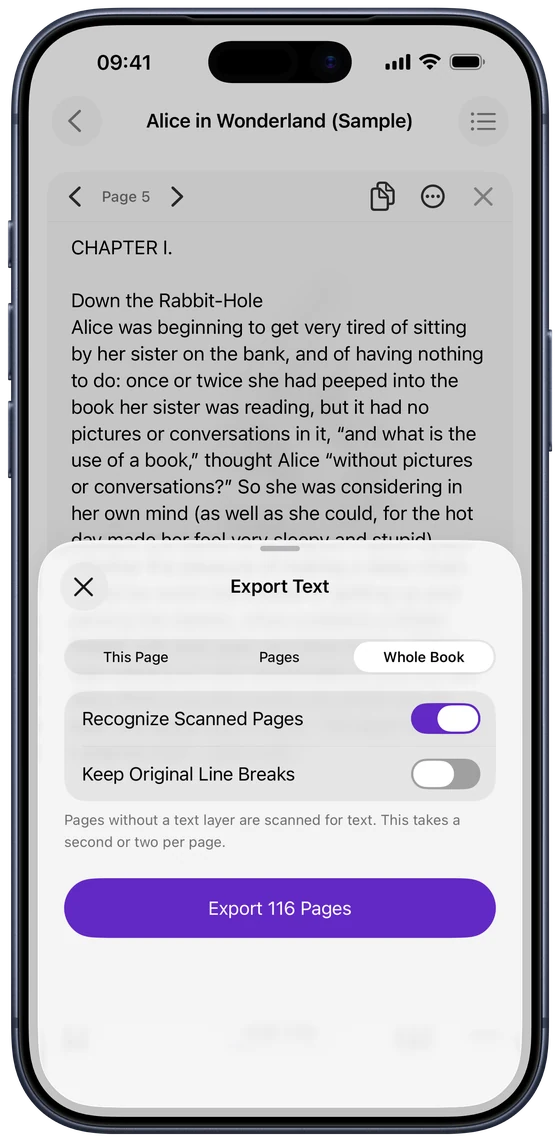
Our web converters don't run text recognition, so a scan without a text layer stays an image there. DjVu Reader for iPhone and iPad does: it recognises the text on scanned pages on your device, with nothing uploaded. To get the text of the whole book:
- Open the book in DjVu Reader, tap ••• and choose Extract Text. Seeing and copying a page's text is free.
- In the Extract Text panel, tap ••• › Export as Text File… (Pro), choose Whole Book and keep Recognize Scanned Pages on.
- Save the .txt file to Files or share it to another app. It's plain text rather than an EPUB, and Kindles accept it through Send to Kindle.
Common questions
- Why is my DjVu to EPUB conversion empty?
- Because the DjVu has no text layer: its pages are pictures, and the converter had no text to put in the EPUB. Check in the online DjVu viewer: if search finds nothing, there's no text. The text has to be recognised first, which DjVu Reader does on iPhone and iPad.
- Can I convert DjVu to EPUB with OCR online?
- Our DjVu to EPUB converter uses the text layer that's already in the book and doesn't run OCR, which keeps it fast and private. For scans without a text layer, DjVu Reader recognises the text on your iPhone or iPad and exports it as a text file (Pro).
- Why are there mistakes in the EPUB text?
- The text comes from the recognition done when the book was scanned, and the converter keeps it as it is. Modern scans are usually very accurate; old books, faded print, unusual fonts and formulas often have misread letters.
- Is FB2 better than EPUB for a DjVu book?
- They hold the same text, paragraphs and chapters. Choose FB2 if your e-reader or app prefers it, as many popular in Russia and Eastern Europe do; choose EPUB for Kindle, Kobo and Apple Books.
- Can I turn a DjVu into an EPUB that keeps the page layout?
- Not usefully: an EPUB that keeps the layout is just page pictures, which don't reflow. To keep the pages as printed, convert to PDF, which opens on almost every e-reader, phone and computer.
Open your first DjVu book.
Free on the App Store for iPhone and iPad.