How to open DjVu files on Android (and any phone)
Updated October 22, 20265 min read
Android phones can't open DjVu files on their own: tap a .djvu file and nothing on the phone knows what to do with it. You don't have to install anything to read it, though. Here's how to open DjVu on Android in your browser, and what works on iPhone and other phones.
Step 1
Open the online DjVu viewer in Chrome
On your Android phone or tablet, open Chrome and go to djvu.app/djvu-viewer, our free online DjVu viewer. It reads DjVu with an engine that runs inside your browser, so there's no app to install, no sign-up and no file size limit, and your book stays on your phone: nothing is uploaded. A recent version of Firefox, Edge or your phone's own browser works too.
Step 2
Tap Open a DjVu file and pick the book
Tap Open a DjVu file. Your phone asks where to pick the file from: choose Files (or Browse, depending on the phone), open Downloads and tap the .djvu or .djv file. If you only see photos and videos, look for that Files or Browse option in the picker's menu. Books in Google Drive can be picked the same way. If the file is still inside a ZIP, unpack it first in your Files app.
Step 3
Read, search and zoom
The book opens on your phone's screen. Pinch to zoom, or use the bar at the bottom of the screen, and try these:
- Search (the magnifying glass at the top) finds any word in books that have a text layer, with every match highlighted.
- Pages and contents (the grid button in the bottom bar) jumps to a chapter or a page thumbnail.
- ••• at the top holds the rest: Fit width for the largest text (turn the phone sideways for bigger print), Page colour (White, Sepia or Night) and Convert to PDF for a PDF copy of the book.
Where to find a downloaded DjVu file on Android
Books you download in Chrome go to your phone's download folder. To find one:
- In Chrome: tap ⋮ at the top right and choose Downloads.
- In the Files app: open Files and look in Downloads.
- On a Samsung phone: open My Files (often in the Samsung folder) and tap Downloads, or go to Internal storage › Download.
Why Android can't open DjVu by itself
DjVu is a format for scanned books, and Android, like iOS, Windows and macOS, has no built-in DjVu viewer. Your phone can store a .djvu file but has nothing to draw its pages with, so you need either a viewer in the browser, an app that reads DjVu, or a copy in a format the phone already opens. More about the format in what is a DjVu file.
Prefer an app? Choosing a DjVu reader on Google Play
If you read DjVu books every day, a reader app can be handier: it keeps a library and remembers your page. Several DjVu readers are on Google Play. Before you install one, look at its listing:
- Install from Google Play only, not from a site offering an APK file.
- Data safety: the listing's Data safety section shows what the developer says the app collects and shares. A book reader has no need for your contacts or location.
- Ads: a “Contains ads” label under the Install button means the app shows ads.
- Updates and reviews: check when it was last updated, and read recent reviews for complaints about pop-ups or crashes.
Convert DjVu to PDF for your phone's own apps
Almost every phone opens PDF without extra apps, so a PDF copy is the easiest way to keep a book readable everywhere or send it to someone. Our free DjVu to PDF converter works in your phone's browser: pick the file, wait a moment and download the PDF. It keeps the book's searchable text and turns the contents into PDF bookmarks, and nothing is uploaded. Expect the PDF to be larger than the DjVu; see DjVu vs PDF for why.
On iPhone and iPad
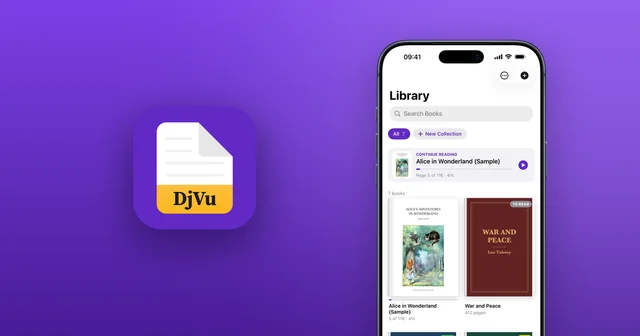
The online viewer works in Safari too, but for longer reading on iPhone and iPad, the free DjVu Reader app is more comfortable. It opens .djvu files from Files, Safari, Mail and messaging apps, keeps your books in a library, remembers your page and works offline. It also recognises the text on scanned pages, so you can copy it for free, or search it and have it read aloud with Pro. The free version includes 3 book uploads. Step by step: how to open DjVu files on iPhone.
Common questions
- Can I open a DjVu file on Android without an app?
- Yes. Open our online DjVu viewer in Chrome and choose the file. The book opens in the browser, and nothing is installed or uploaded.
- How do I open a DjVu file on a Samsung phone?
- The same way as on any Android phone: open the online DjVu viewer in Chrome or Samsung Internet, tap Open a DjVu file and pick the book from Downloads. In the My Files app, downloaded books are under Downloads.
- Is it safe to open private documents this way?
- Yes. The viewer reads the file in your browser, on your phone. The book is never sent to a server or stored anywhere.
- Does it work on an Android tablet?
- Yes. It works the same in Chrome on a tablet, and the bigger screen makes scanned pages easier to read.
- Can I copy text from a DjVu book on my phone?
- Yes, when the book has a text layer: select text on the page in the viewer and copy it. For editable text, DjVu to Word or DjVu to TXT save the whole book's text. On iPhone and iPad, DjVu Reader also recognises text on scans that have none.
Open your first DjVu book.
Free on the App Store for iPhone and iPad.