djvu.app vs PDF2Go for DjVu to PDF
Facts checked October 22, 20264 min read
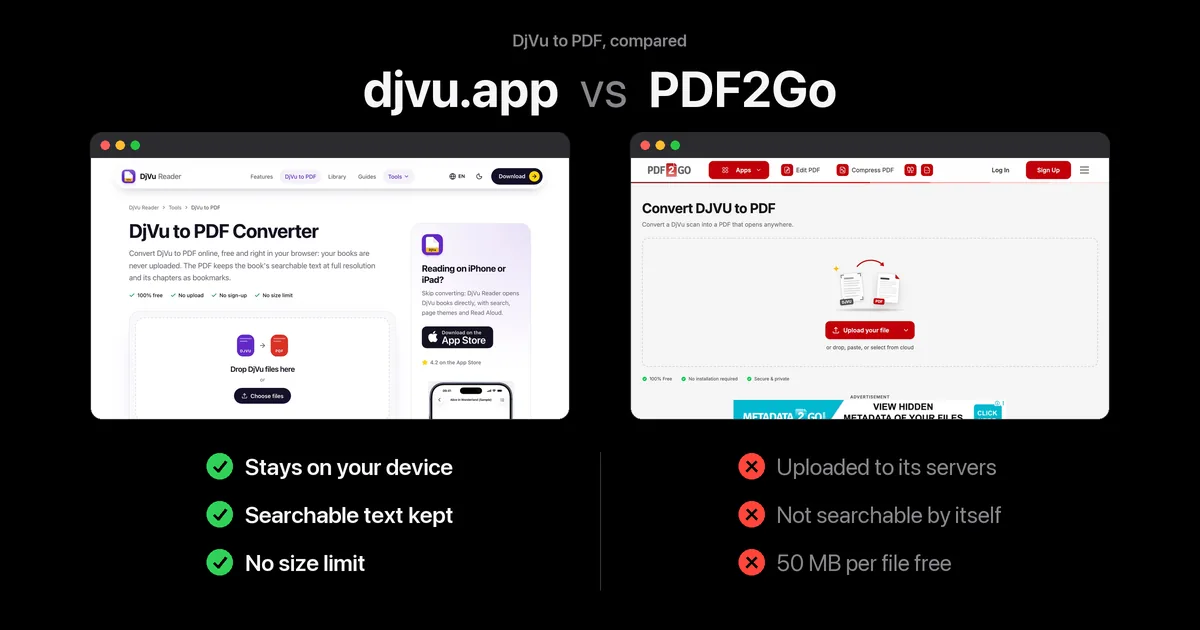
PDF2Go is a suite of about fifty PDF tools from QaamGo in Germany, with a DjVu to PDF converter and an optional “Convert with OCR” step for premium users. djvu.app is a set of DjVu tools that run in your browser, with no upload. Here they are side by side for DjVu books.
Side by side
| Feature |  djvu.app | PDF2Go |
|---|---|---|
| Where your file goes | YesStays in your browser; nothing is uploaded | NoUploaded; the page says no backup is kept and nobody opens your document |
| Price | YesFree, no plans, no credits | PartlyFree tier; Starter, Pro and Business plans (prices not shown on the page) |
| File size limit | YesNone | No50 MB without an account; up to 64 GB on paid plans |
| Daily limits | YesNone | PartlyNot stated on its converter page |
| Account | YesNone | YesNot needed |
| Ads | YesNone | NoAds on the free tier |
| Searchable text in the PDF | YesKept, with the book's chapters as PDF bookmarks | NoIts page says the converted PDF “is not searchable by itself” and points to its searchable-PDF tool |
| Scans without a text layer | PartlyPages without a text layer stay images (no OCR) | YesOCR, on premium plans only |
| Batch | YesSeveral books at once, downloaded as one ZIP | PartlyNot stated on its page |
| Other DjVu tools | YesViewer; DjVu to PDF, JPG, PNG, TXT, Word, EPUB, FB2; PDF and JPG to DjVu; merge, split, compress | PartlyAbout 50 PDF tools; no other DjVu conversions, no viewer |
| Works on | YesAny device with a recent browser (Safari 16.4, Chrome 111, Firefox 128 or later) | YesAny browser; Zapier and Make integrations |
The other side's facts come from its App Store page or website on the date above, ours from the app and this site. Something changed? Tell us at support@djvu.app and we'll update the page.
How the two work
PDF2Go uploads the DjVu to its servers in Germany, converts it, and lets you download the PDF; the page says no copy is kept and files are never used to train AI models. The free tier is limited to 50 MB per file and shows ads. djvu.app runs the converter in your browser on your device, so there is no upload and no limit to set.
Where PDF2Go is better
PDF2Go is a PDF workshop, and the DjVu converter is one bench in it.
- OCR: premium users can convert with text recognition, which makes a scan without a text layer searchable. djvu.app keeps an existing text layer but doesn't recognise text.
- The PDF tools: compress, merge, split, edit, sign and about fifty more, all on the same site.
- Integrations: Zapier and Make, and a developer page.
Where djvu.app is better
For the DjVu to PDF step itself, djvu.app removes the limits and keeps more of the book.
- Searchable from the start: a DjVu book's text layer goes into the PDF, so you can search and copy, and its chapters become bookmarks. PDF2Go's page says its converted PDF isn't searchable by itself.
- No 50 MB cap: scanned books are often larger than that; djvu.app has no cap.
- No upload, no ads: the file stays on your device and the page shows no advertising.
- DjVu both ways: PDF and JPG to DjVu, a viewer, and DjVu to JPG, PNG, TXT, Word, EPUB and FB2, plus merge, split and compress.
Which to use
If a scan has no text layer and you need a searchable PDF, PDF2Go's premium OCR does that. For every DjVu book that already has text (most scanned libraries do), the DjVu to PDF converter here keeps it searchable for free, without the file leaving your device.
Common questions
- Is the PDF from PDF2Go searchable?
- Its DjVu to PDF page says the converted file is not searchable by itself and points to a separate searchable-PDF tool; OCR is a premium feature. djvu.app keeps the book's text layer in the PDF.
- What is PDF2Go's free file size limit?
- 50 MB without an account, according to its page. djvu.app has no limit because the conversion runs on your device.
- Does PDF2Go keep my file?
- Its page says no backup of a user file is kept and nobody opens your document. On djvu.app the file is never uploaded.
Try DjVu Reader for yourself.
Free on the App Store for iPhone and iPad.