djvu.app vs DjVu.js for reading DjVu files online
Facts checked October 22, 20264 min read
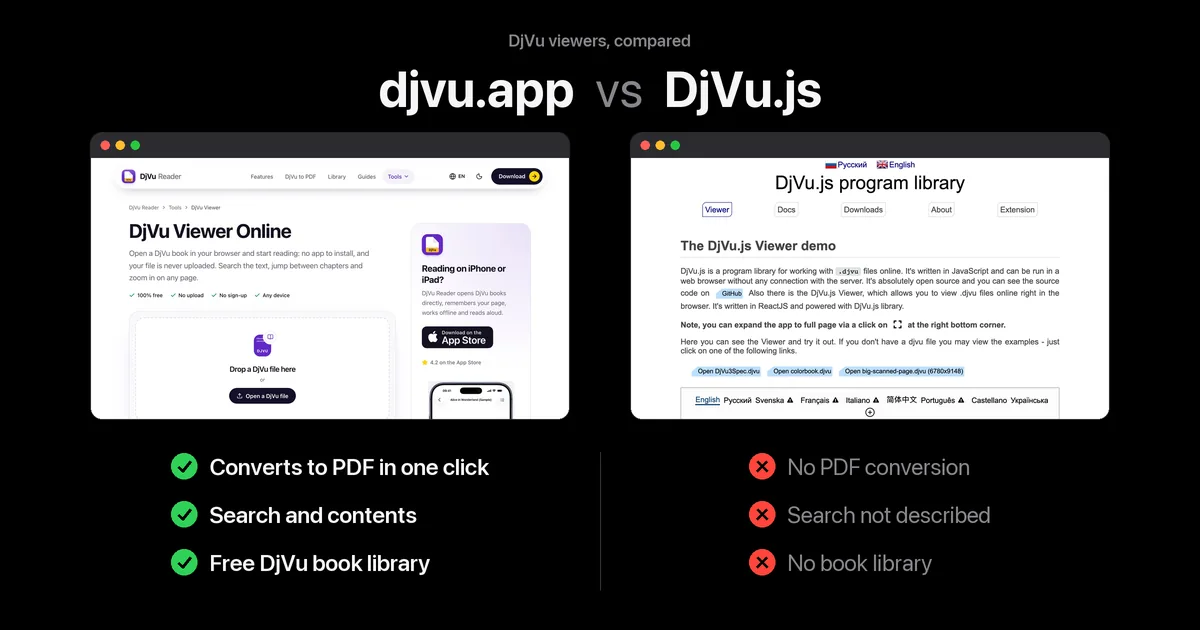
DjVu.js at djvu.js.org is an open-source DjVu viewer written in JavaScript: it renders DjVu pages in the browser without any server, can be embedded on other sites, and comes with a library and a browser extension that opens .djvu links directly. The DjVu viewer on djvu.app also runs entirely in your browser. The two agree on the important part and differ on the rest.
Side by side
| Feature |  djvu.app | DjVu.js (djvu.js.org) |
|---|---|---|
| Where your file goes | YesStays in your browser; nothing is uploaded | YesStays in your browser; runs without any connection to a server |
| Price | YesFree, no plans, no credits | YesFree, open source |
| File size limit | YesNone | YesNone stated |
| Account | YesNone | YesNone |
| Ads | YesNone | YesNone |
| Search the text | YesAny word in books with a text layer, every match highlighted on the page | PartlyNot described on its page |
| Contents and thumbnails | YesJump from the table of contents or page thumbnails | PartlyNot described on its page |
| Copy text | YesSelect and copy from the page | PartlyNot described on its page |
| Convert | YesOne click to PDF; also JPG, PNG, TXT, Word, EPUB, FB2 | NoNo PDF conversion; the library can split and join .djvu files and make DjVu from images |
| Embed on your own site | NoNo | YesYes, as a widget; a JavaScript library and a browser extension too |
| Books to read | YesA public-domain library in English and Russian | NoNo |
| Known limits | PartlyNeeds a recent browser | PartlyIts page says some DjVu files may not render |
The other side's facts come from its App Store page or website on the date above, ours from the app and this site. Something changed? Tell us at support@djvu.app and we'll update the page.
How the two work
Both viewers load a DjVu decoder into your browser and draw the pages from the file on your device; neither sends the book anywhere. DjVu.js is a JavaScript library with a viewer built on it; djvu.app's viewer is built on a DjVu engine compiled to WebAssembly, which is why it needs a recent browser (Safari 16.4, Chrome 111, Firefox 128 or later).
Where DjVu.js is better
DjVu.js is a building block as much as a viewer.
- Embeddable: drop the viewer into any web page as a widget.
- A library for developers: render pages, split and concatenate .djvu files, make DjVu from images, read metadata.
- A browser extension that opens .djvu links from the web directly in the viewer.
- Open source, so anyone can read the code and run it themselves.
Where djvu.app is better
djvu.app is made for reading and getting things done with the book.
- Search, contents, thumbnails, copy: find any word in a book with a text layer, jump between chapters or pages, and copy text straight from the page.
- Convert in one click: PDF with the text layer and chapters as bookmarks, or JPG, PNG, TXT, Word, EPUB and FB2, still without uploading.
- Edit: merge, split and compress DjVu files, and make DjVu from PDF or JPG.
- Something to read: a library of public-domain books in their original editions, opening in the same viewer.
- The iPhone and iPad app for reading the same books offline, with Read Aloud and search in scans.
Which to use
Developers and site owners: DjVu.js. Readers: the online DjVu viewer here, and the library when you want a book to start with.
Common questions
- Does DjVu.js upload my file?
- No. Its site says it runs in the browser without any connection to the server. djvu.app's viewer works the same way.
- Can DjVu.js convert DjVu to PDF?
- No; its library can split and join DjVu files and make DjVu from images, but not PDF. djvu.app's viewer converts the open book to PDF with one click, and to other formats from the tools page.
- Which viewer can search inside the book?
- djvu.app's viewer searches the text of books that have a text layer and highlights every match. DjVu.js's page doesn't describe search.
Try DjVu Reader for yourself.
Free on the App Store for iPhone and iPad.