djvu.app vs djvu2pdf.com for DjVu to PDF
Facts checked October 22, 20263 min read
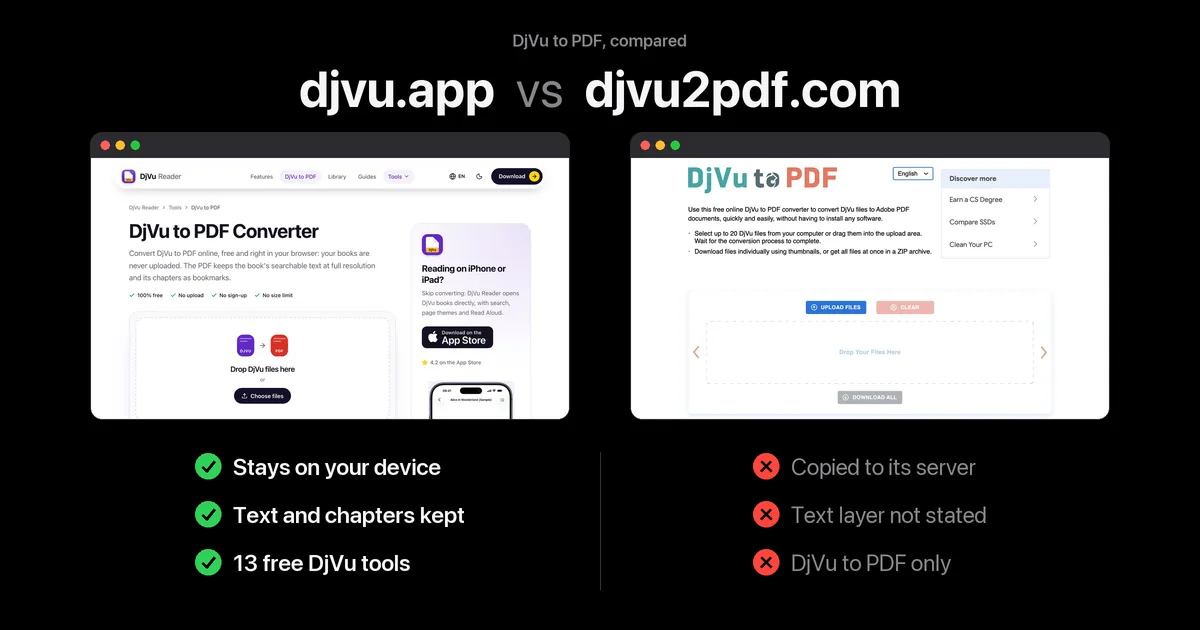
djvu2pdf.com does one thing: you add up to 20 DjVu files, its server converts them to PDF, and you download them one by one or as a ZIP. It is free and asks for no account. djvu.app also converts DjVu to PDF for free, but in your browser, and offers a dozen more DjVu tools next to it.
Side by side
| Feature |  djvu.app | djvu2pdf.com |
|---|---|---|
| Where your file goes | YesStays in your browser; nothing is uploaded | NoCopied to its server; files and PDFs deleted after 60 minutes |
| Price | YesFree, no plans, no credits | YesFree; no premium tier |
| File size limit | YesNone | PartlyNot stated on its page |
| Daily limits | YesNone | Yes“Convert as many files as you wish” |
| Account | YesNone | YesNone |
| Ads | YesNone | PartlyNot stated on its page |
| Searchable text in the PDF | YesKept, with the book's chapters as PDF bookmarks | PartlyNot stated on its page |
| Scans without a text layer | PartlyPages without a text layer stay images (no OCR) | PartlyNot stated on its page |
| Batch | YesSeveral books at once, downloaded as one ZIP | YesUp to 20 files per queue, downloaded one by one or as a ZIP |
| Other DjVu tools | YesViewer; DjVu to PDF, JPG, PNG, TXT, Word, EPUB, FB2; PDF and JPG to DjVu; merge, split, compress | NoDjVu to PDF only; no viewer |
| Works on | YesAny device with a recent browser (Safari 16.4, Chrome 111, Firefox 128 or later) | YesAny browser |
The other side's facts come from its App Store page or website on the date above, ours from the app and this site. Something changed? Tell us at support@djvu.app and we'll update the page.
How the two work
djvu2pdf.com says plainly that its server makes a copy of your original, converts it and deletes both after 60 minutes. There is no watermark and no registration. djvu.app sends nothing: the converter runs in your browser, reads the book from your device and writes the PDF there.
Where djvu2pdf.com is better
It is about as simple as a converter can be.
- One page, one job: add files, download PDFs, done.
- Batch of 20 with a ZIP download.
- Free with no plan to upsell.
Where djvu.app is better
Same simplicity, without the server in the middle.
- No upload: nothing to copy and nothing to delete after an hour.
- What's in the PDF is stated: the book's searchable text at full resolution and its chapters as bookmarks. djvu2pdf.com's page doesn't say what happens to the text layer.
- No size limit: large scans convert on your device; djvu2pdf.com doesn't state a limit.
- Thirteen tools, not one: an online viewer, DjVu to JPG, PNG, TXT, Word, EPUB and FB2, PDF and JPG to DjVu, merge, split and compress.
Which to use
Either converts a DjVu book for free. If you'd rather the file didn't go to a server, or you also want to read it online or split it first, use the DjVu to PDF converter and the other tools here.
Common questions
- Does djvu2pdf.com upload my file?
- Yes. Its page says the server makes a copy of the original and deletes files and PDFs after 60 minutes. djvu.app converts in your browser and uploads nothing.
- Which one keeps the text searchable?
- djvu.app keeps the book's text layer in the PDF and turns its chapters into bookmarks. djvu2pdf.com's page doesn't state what happens to the text layer.
- Can I convert many files at once on djvu.app?
- Yes. Add several books and download them together as one ZIP.
Try DjVu Reader for yourself.
Free on the App Store for iPhone and iPad.