How to search inside a scanned DjVu book
Updated October 15, 20262 min read

You know the term is somewhere in the book, but search finds nothing. Usually that's because the book is a scan. Here's how searching DjVu books works, and how to search scans too.
How to search a book
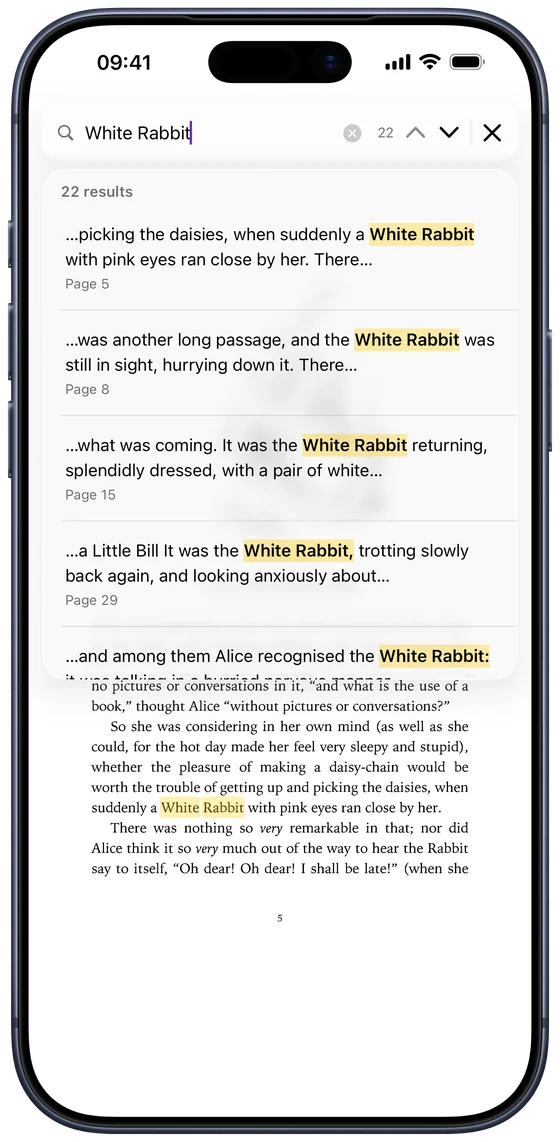
Open the book, tap ••• and choose Search in Document (with a keyboard on iPad, press ⌘F). As you type, results appear with a line of context and the page number, and every match is highlighted on its page. Use the up and down arrows to jump between matches, or tap a result to go straight to it.
Why search finds nothing in some books
Search reads a book's text, and many DjVu books don't have any: they're pictures of pages. Only books that went through text recognition when they were made carry a hidden text layer that can be searched. If a book has none, or only some pages do, search can come back empty even though you can see the word on the page.
Search scanned pages too
When some pages have no text layer, a Search Scanned Pages button appears under the results. Tap it and DjVu Reader recognises the text on those pages, on your device, and adds what it finds. It's slower than a normal search, a second or two per page, but each page is only recognised once: searching the same book again is instant. Searching scanned pages is part of Pro.
Tips for better results
Search is forgiving:
- Capital letters and accents don't matter: “cafe” finds “Café”.
- Phrases work: search for several words in a row.
- Hyphenated words are found: a word split across two lines still matches.
- Recognition isn't perfect: on faded scans, try a shorter or different word.
Searching your library vs inside a book
The Search Books field at the top of the Library finds books by their name. To find words inside a book, open it and use Search in Document.
Common questions
- Why can't I search my DjVu book?
- It's probably a scan without a text layer. Use Search Scanned Pages in DjVu Reader to recognise and search the text on those pages.
- Is search free?
- Searching books that have a text layer is free. Searching scanned pages without a text layer is part of Pro.
- Does search work offline?
- Yes. Both normal search and text recognition run on your device.

Open your first DjVu book.
Free on the App Store for iPhone and iPad.